FDA Prior Notice setup and filing guide
How to complete FDA Prior Notice in PNSI
Set up an FDA Industry Systems account, gather the right shipment details, file each food article, and give the confirmation to your carrier before FDA’s deadline.
Prior Notice is not shipment approval. FDA’s confirmation only means the submission appears complete enough for review. The shipment can still be examined, held, or refused, and other FDA, CBP, USDA, labeling, facility-registration, or FSVP requirements may apply.
Check before filing
Does your shipment require FDA Prior Notice?
Prior Notice generally applies when human food, animal food, beverages, ingredients, dietary supplements, or other FDA-regulated food is imported or offered for import into the 50 states, District of Columbia, or Puerto Rico. The exporter’s country does not change the rule. Shipments from Canada, Mexico, Europe, Asia, and every other origin are evaluated the same way.
Usually requires Prior Notice
- Commercial food, beverage, ingredient, dietary-supplement, pet-food, or animal-feed shipments
- Food samples for sales, market research, quality control, or testing, unless a narrow policy applies
- Food sent by postal service or express courier
- Food entering a U.S. Foreign Trade Zone or transiting the United States
- U.S.-origin food returning after export
Regulatory exemptions include
- Food accompanying a traveller for that person’s personal use, family, friends, or pets, with no sale or distribution
- Food made in an individual’s home and sent by that individual as a personal, non-business gift
- Food exported without leaving the U.S. port of arrival
- Meat, poultry, and egg products under USDA’s exclusive jurisdiction at import
- Food in qualifying diplomatic bags or pouches
Submission timing
File after the shipment is planned, but before its arrival window.
For a PNSI filing, FDA generally accepts the submission no more than 15 calendar days before anticipated arrival. FDA must receive and confirm it before the shipment reaches the first U.S. port, with these minimum lead times.
Build in a practical buffer. Filing at the minimum deadline leaves no room to correct an entry, replace a submission, or communicate the confirmation to the carrier. If confirmed information changes and a new Prior Notice is required, the timing clock starts again when FDA confirms the replacement.
Gather this before you log in
The screens vary by shipment type. This preparation list covers the information most filers need.
About the interface references: The cropped screens below come from FDA’s official PNSI User Guide, Version 3, updated August 21, 2025. Example values illustrate the workflow and are not filing instructions. FDA may change screens or fields, so follow the live system when it differs.
One-time setup
Create an FDA Industry Systems account
Go to FDA Industry Systems, select Create New Account, and select Prior Notice System Interface as a system you need to access. Enter the account holder’s real contact information, accept the federal false-statement notice, review the details, and submit.
Save the Account ID shown after successful creation. You will need the Account ID and password for later submissions.
Access the filing system
Open PNSI and start a new submission
After signing in, select Prior Notice System Interface. On the PNSI home page, select Create New Prior Notice. Existing work appears under submissions and drafts.
PNSI uses a left navigation panel. A red exclamation mark means a section is incomplete. A green check mark means the section has the required information.
Choose carefully
Select the shipment or entry type
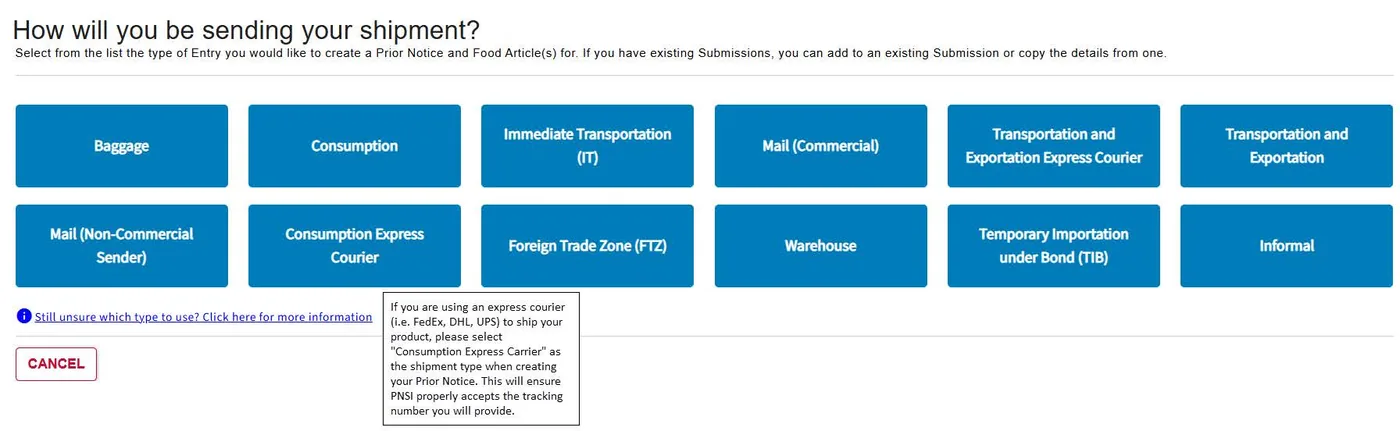
Select the type that matches how the goods will enter or move through the United States. PNSI may show options such as Consumption, Express Courier, Mail Commercial, Baggage, Transportation and Exportation, Immediate Transportation, Foreign Trade Zone, Warehouse, Temporary Importation under Bond, or Informal.
Consumption is commonly used when imported food will enter U.S. commerce without CBP time or use restrictions. Other movements require different types.
Match the transport plan
Enter the shipment, carrier, and arrival details
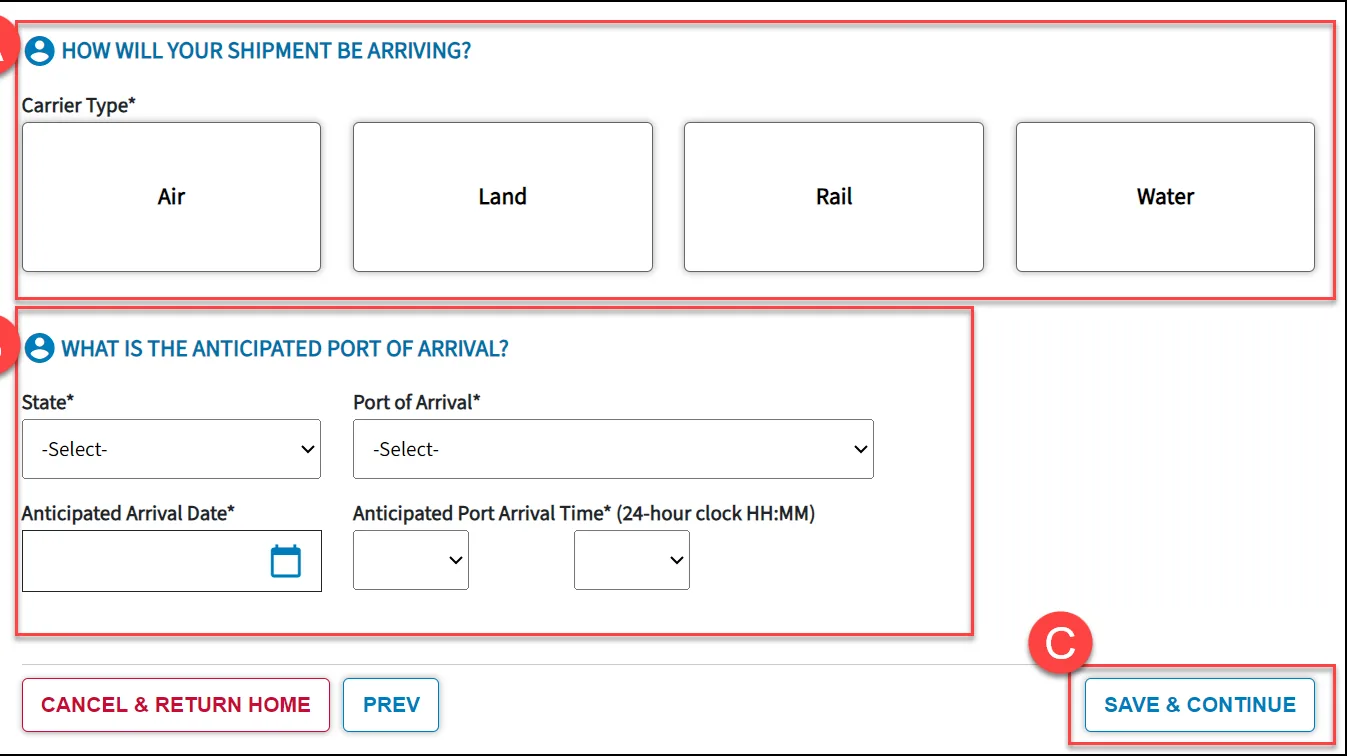
Enter the CBP Entry Identifier when one is available. For qualifying types, PNSI can generate an identifier. Then select the carrier type or mode and complete every field marked with an asterisk.
Use the first U.S. port of arrival
Enter the location, anticipated date, and anticipated time when the shipment will first reach the United States, not the final delivery location. Match carrier names, voyage or flight information, vehicle or rail identifiers, airway bill, bill of lading, or tracking information to the actual booking and selected mode.
Identify the responsible parties
Complete submitter and importer information
Choose whether you are filing for yourself or someone else. Filing for yourself can prefill the account holder’s details. If someone else is the submitter, enter that person’s business and contact information accurately.
On the Importer Details page, identify the U.S. importer for this shipment. The importer, owner, ultimate consignee, submitter, and transmitter can be different parties. Do not copy one company into every role unless that is factually correct.
One line item at a time
Add each food article and choose its FDA product code
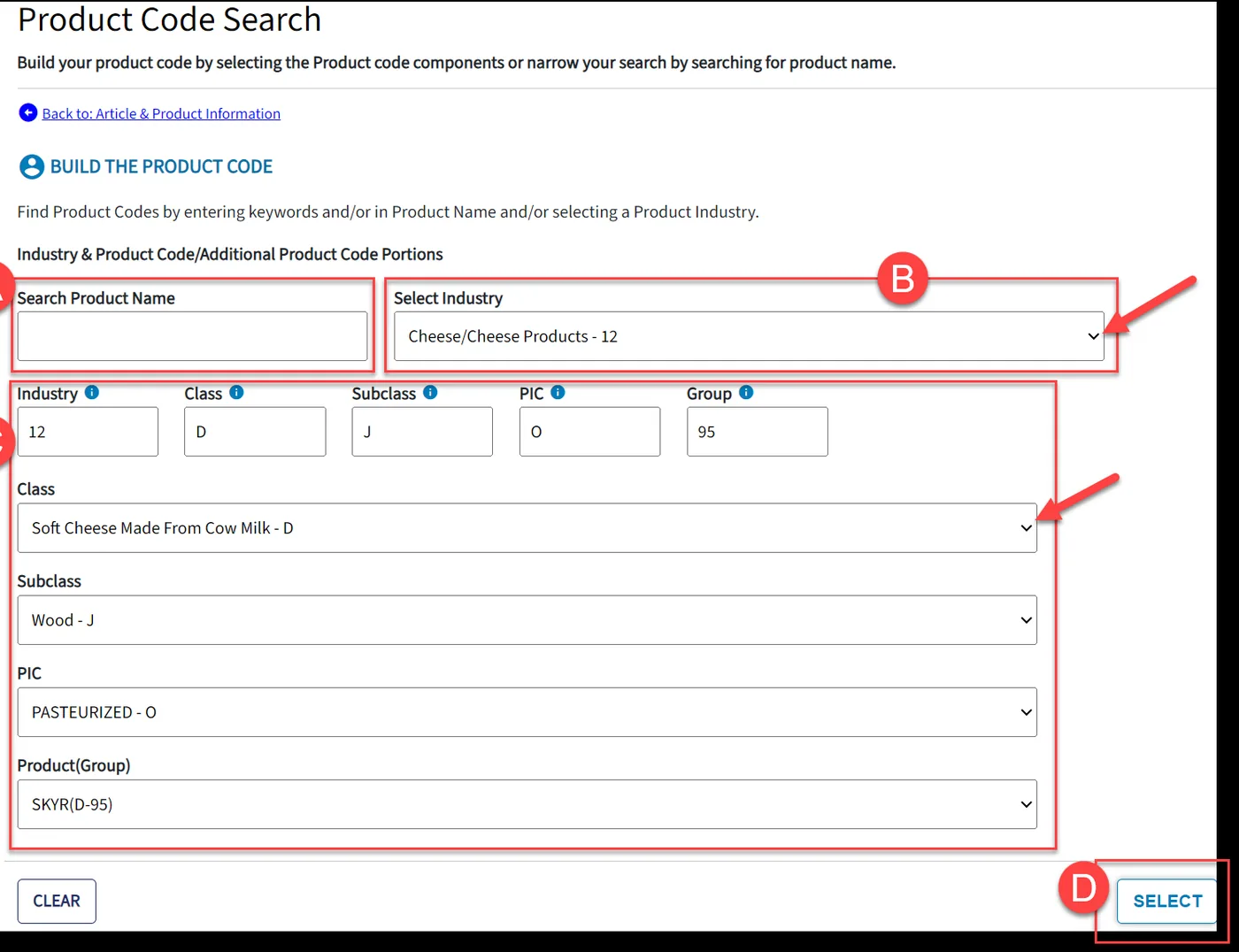
From the Prior Notice Overview, select Add Food Article. Enter the common or usual market name and any required lot or production identifiers. If you know the FDA product code, enter it. Otherwise, use Product Code Search.
The product-code workflow narrows the item through Industry, Class, Subclass, Process Indicator Code, and Product Group. Choose the code that describes the actual product, processing, and packaging, not merely the closest name.
When to create another food article
Add separate articles when the product identity, product code, manufacturer or grower, country of production, or other article-level details differ. Repeat identical shipment parties only where PNSI allows and the fact remains true.
Describe the physical shipment
Enter quantity, packaging, and refusal information
For packaged goods, work from the outer shipping level to the base unit. Enter package count and package type for each level, then the base weight or volume. PNSI currently permits up to five packaging levels. For a true bulk shipment, enter the total amount and base unit.

| Physical shipment | How to think about the entry |
|---|---|
| 10 cartons, each with 24 jars of 250 g | Record carton and jar levels, then the 250 g base amount using the available PNSI units. |
| One tanker of bulk edible oil | Choose bulk only when the food is not divided into packaged units, then enter total quantity and unit. |
Answer whether any country has refused entry to this article. If yes, identify every applicable country available in the system.
Trace the product and custody
Add the manufacturer or grower, shipper, owner, and consignee
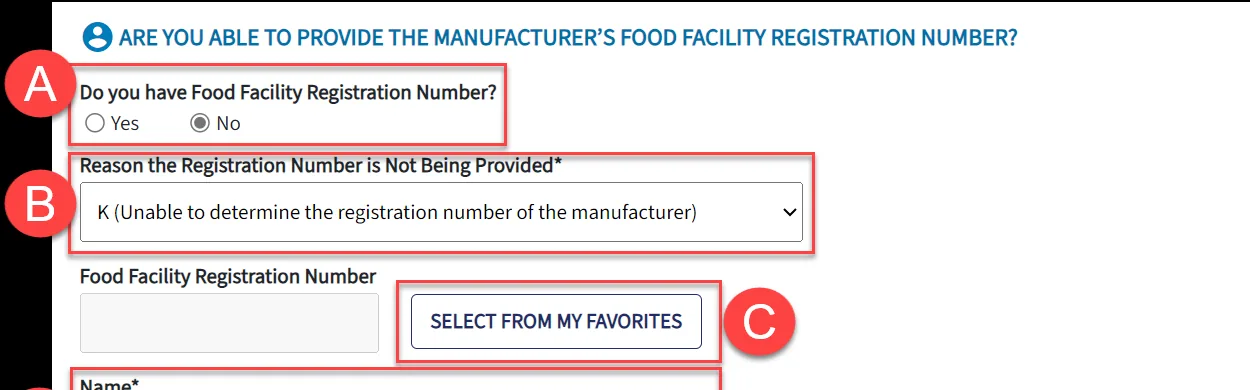
PNSI changes the next screen according to the product code. Processed food generally requires the last facility that manufactured or processed the food. Food in its natural state generally requires the grower and growing location, if known. A consolidator can be used only in the circumstances allowed by FDA.
- Manufacturer or grower: use the actual facility and FDA Food Facility Registration number where applicable. If no number is provided, select only a valid reason and provide the required address.
- Shipper: identify the party shipping the article from the foreign country. This is not automatically the carrier.
- Owner: identify the owner of the article at the relevant time.
- Ultimate consignee: identify the U.S. party that will receive the article, subject to the selected entry type.
Final accuracy check
Review every article, then submit to FDA
Select Review after every navigation item has a green check. Check names, addresses, product codes, package counts, facility information, countries, route, port, and arrival timing against the commercial invoice, packing list, carrier booking, and broker instructions.
Select Add Article to my Prior Notice Submission, then add another food article or finish. On the Submission Summary, make any final edits and select Submit to FDA.
Do not stop at submission
Generate the PDF and send the confirmation to the carrier
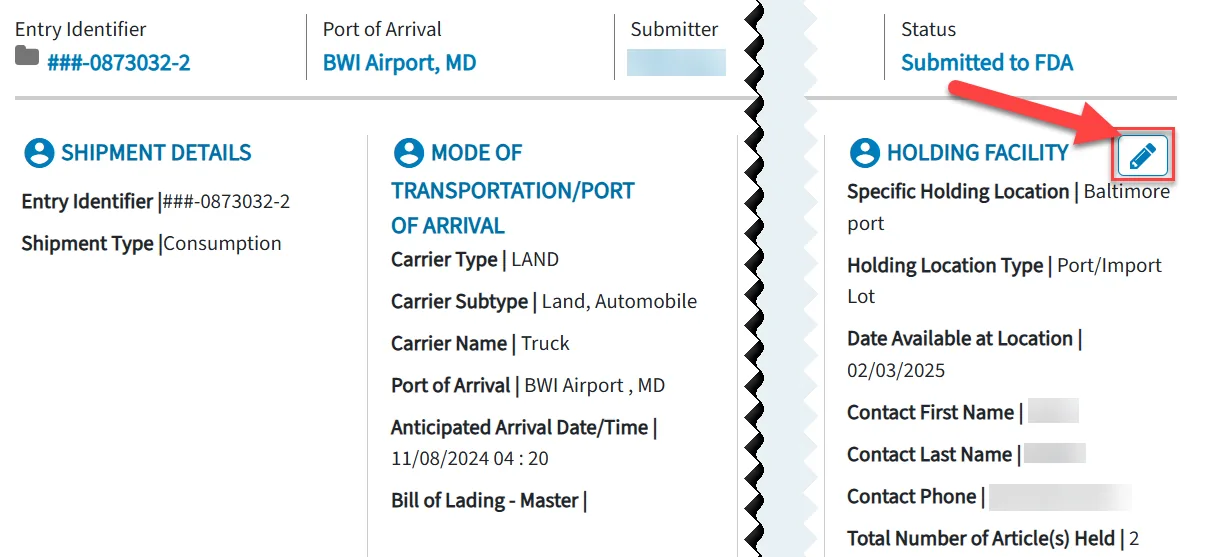
Confirm that the status reads Submitted to FDA. Select Generate PDF, save the PDF with its barcode and PN Confirmation Number, and retain it with the shipment records.
- For a commercial carrier when PNSI was used, give the carrier the PN Confirmation Number.
- For international mail, place the PN Confirmation Number on the parcel.
- For food accompanying an individual when Prior Notice applies, the individual must carry the confirmation.
Tell the broker, importer, and receiving party which confirmation applies to each food article. Do not treat the number as FDA approval or release.
Express courier workflow
Create the courier shipment first, then complete Prior Notice
For an ordinary FedEx, UPS, or DHL Express shipment entering U.S. commerce, PNSI normally uses Consumption Express Courier. A shipment transiting the United States may require a Transportation and Exportation express-courier type instead. Confirm the customs movement before choosing because PNSI does not let you change the shipment type later.
- Create the actual courier shipment and shipping label or air waybill. A saved quote, address-book entry, shipment profile, or unfinished draft does not provide the tracking number PNSI needs.
- Record the assigned tracking or waybill number. Creating the label does not mean the carrier has possession of the package. Do not tender it yet.
- Complete PNSI using the issued number. Select the live carrier and mode, and use the actual first U.S. port, arrival date, and arrival time when PNSI requires them.
- Add the FDA confirmation to the courier documents. Follow the carrier-specific instructions below for the commercial invoice, waybill description, and confirmation PDF.
- Verify the documents before pickup or drop-off. Confirm that the tracking number, carrier, shipment contents, invoice, and FDA confirmation all refer to the same shipment.
FedEx Express
Common hub reference, not a default- Common port reference
- Tennessee, FedEx Memphis, port code 2095. Use it only when FedEx confirms that Memphis is the shipment’s first U.S. port.
- Carrier and mode
- Carrier Type: Air. Mode: Express Courier – Air. FedEx’s March 2025 PNSI guide uses IATA code FX.
- Tracking field
- Enter the 12-digit FedEx air waybill number assigned when the shipment is created, exactly as issued.
- Arrival date and time
- Use the confirmed first-U.S.-gateway flight date and local arrival time. FedEx’s current guide tells filers to obtain the flight information from customer service.
- Carrier handoff
- FedEx Canada says to include three copies of the PN web-entry summary confirmation and commercial invoice, and write the confirmation number in the FedEx International Air Waybill description.
UPS
Common hub reference, not a default- Common port reference
- Kentucky, UPS Louisville, port code 4196. Use it only when UPS confirms that Louisville is the shipment’s first U.S. port.
- Carrier and mode
- Carrier Type: Air. Mode: Express Courier – Air. UPS’s current IATA operator code is 5X. Use PNSI’s carrier lookup if the live system returns a different operating carrier.
- Tracking field
- Enter the lead UPS tracking number assigned when the shipment is created, exactly as shown on the label. A typical small-package number begins with 1Z, but do not force a format.
- Arrival date and time
- Use the route-specific first U.S. gateway date and local arrival time supplied by UPS. Do not copy the FedEx ship-date-plus-one-day or 20:00 examples.
- Carrier handoff
- UPS Canada recommends attaching the document containing the PNSI number. It may instead be entered in the invoice line-reference or invoice-comments field. UPS can also file for a fee.
UPS Canada FDA shipment guidance and UPS 2025 operator reference
DHL Express
Common hub reference, not a default- Common port reference
- Ohio, DHL Cincinnati, port code 4197. Use it only when DHL confirms that this is the shipment’s first U.S. port.
- Carrier and mode
- Carrier Type: Air. Mode: Express Courier – Air. DHL uses multiple operating airlines, so use PNSI’s Find Carrier Code search and the carrier shown for the booked route rather than assuming one universal IATA code.
- Tracking field
- Enter the 10-digit DHL Express waybill number displayed after shipment creation, exactly as issued.
- Arrival date and time
- Use the route-specific first U.S. gateway date and local arrival time supplied by DHL. Do not use a generic next-day date or default time.
- Carrier handoff
- When the shipper files, DHL instructs the shipper to provide the PN confirmation for each food article, identify the confirmation numbers on the invoice, and clearly describe the contents as food or food product on the air waybill.
DHL U.S. Customs Industry Guide and DHL shipment-creation guide
Do not rely on a carrier-wide arrival default. Port 2095 for FedEx, 4196 for UPS, and 4197 for DHL remain active official Schedule D courier ports, but each carrier has other U.S. gateways. FDA requires shipment-specific information. The old FedEx instructions to enter the ship date plus one day and 20:00 should not be copied unless FedEx confirms those values for the booked shipment.
Accuracy and troubleshooting
Six mistakes that can delay or invalidate a filing
Wrong shipment type
The type cannot be changed after selection. Confirm the customs movement before starting.
Wrong U.S. arrival point
Use the first U.S. port and actual mode, carrier, date, and time, not the final delivery address.
FDA code used like an HTS code
Select the FDA product code from the product’s identity, processing, and packaging.
Parties treated as interchangeable
Submitter, transmitter, importer, owner, shipper, manufacturer, and consignee are distinct roles.
Facility details do not match
Use the actual manufacturing facility and accurate registration data or a valid reason the number is absent.
Confirmation never reaches the carrier
Save the PDF and provide the required confirmation before tender or arrival.
FDA Prior Notice FAQ
Common questions before filing
Can a business outside Canada or Mexico use this guide?
Yes. FDA Prior Notice is based on the food and its import into the United States, not on whether it originates in a particular foreign country. The PNSI workflow can be used by informed filers worldwide.
Can my customs broker or carrier file Prior Notice?
Any individual with knowledge of the required information may submit it, including a manufacturer, exporter, broker, importer, or U.S. agent. Confirm who will file before anyone duplicates the submission. A carrier’s service and responsibility vary.
Does a Prior Notice confirmation mean FDA approved the shipment?
No. It means FDA deemed the submission facially complete for review. It does not confirm accuracy, admissibility, product compliance, facility registration, or release without further FDA action.
Do I need one Prior Notice for every product?
A submission can contain multiple food articles, but each distinct article needs accurate article-level details. Create separate line items when product code, manufacturer or grower, production country, or other required information differs.
Can I edit Prior Notice after FDA confirms it?
No. Submitted fields are locked. FDA guidance says information changes listed in its rule require a new Prior Notice and suggests cancelling the previous submission first. The replacement must still meet the timing requirement.
Is FDA facility registration the same as Prior Notice?
No. Facility registration, Prior Notice, admissibility, labeling, FSVP, and other product or agency requirements are separate. Completing one does not automatically satisfy the others.
What if PNSI is unavailable?
Check FDA’s official system-status page and follow the contingency instructions posted for the outage. Do not invent an offline process or ship without confirmation based only on a local system problem.
Official help and sources
Verify the current FDA screen and rule before filing
FDA can change interfaces, contact details, and requirements. These official resources controlled this guide and should control if the page and FDA differ.
Entry point for the modernized PNSI, user guide, system information, and tutorial.
Official screen-by-screen guide updated August 21, 2025 for creating, reviewing, submitting, copying, and cancelling a Prior Notice.
Scope, exemptions, timing, required information, confirmation, replacement, and contact guidance.
Official account setup and system-access instructions.
Detailed examples concerning scope, personal shipments, samples, gifts, mail, and other scenarios. It is nonbinding draft guidance.
Effective and compliance dates for the post-refusal rules and October 1, 2026 international-mail tracking requirement.
Editorial and regulatory review date: August 13, 2026. This educational guide is not legal advice and does not replace FDA regulations, FDA instructions, a customs broker, or shipment-specific professional advice.
Need help planning the shipment around the filing?
FreightXO can review the route, carrier, timing, customs handoff, and documents needed to move food freight. Regulatory responsibility and final filing accuracy remain with the responsible parties.
Printed from FreightXO. Verify current requirements at FDA.gov before filing.